loadr Desktop
loadr Desktop is a cross-platform GUI for composing, managing and running
loadr test plans, with a live monitoring dashboard. It is a front-end over the
loadr CLI, not a re-implementation: the app spawns a bundled, version-pinned
loadr binary for every operation — validation, schema, running, conversion and
plugins — so the GUI and the CLI can never disagree about what a plan means or
what a run produced.
Status: beta. Built with Electron + TypeScript and a React 19 / Vite 6 / Tailwind 4 renderer. Source lives in
desktop/.
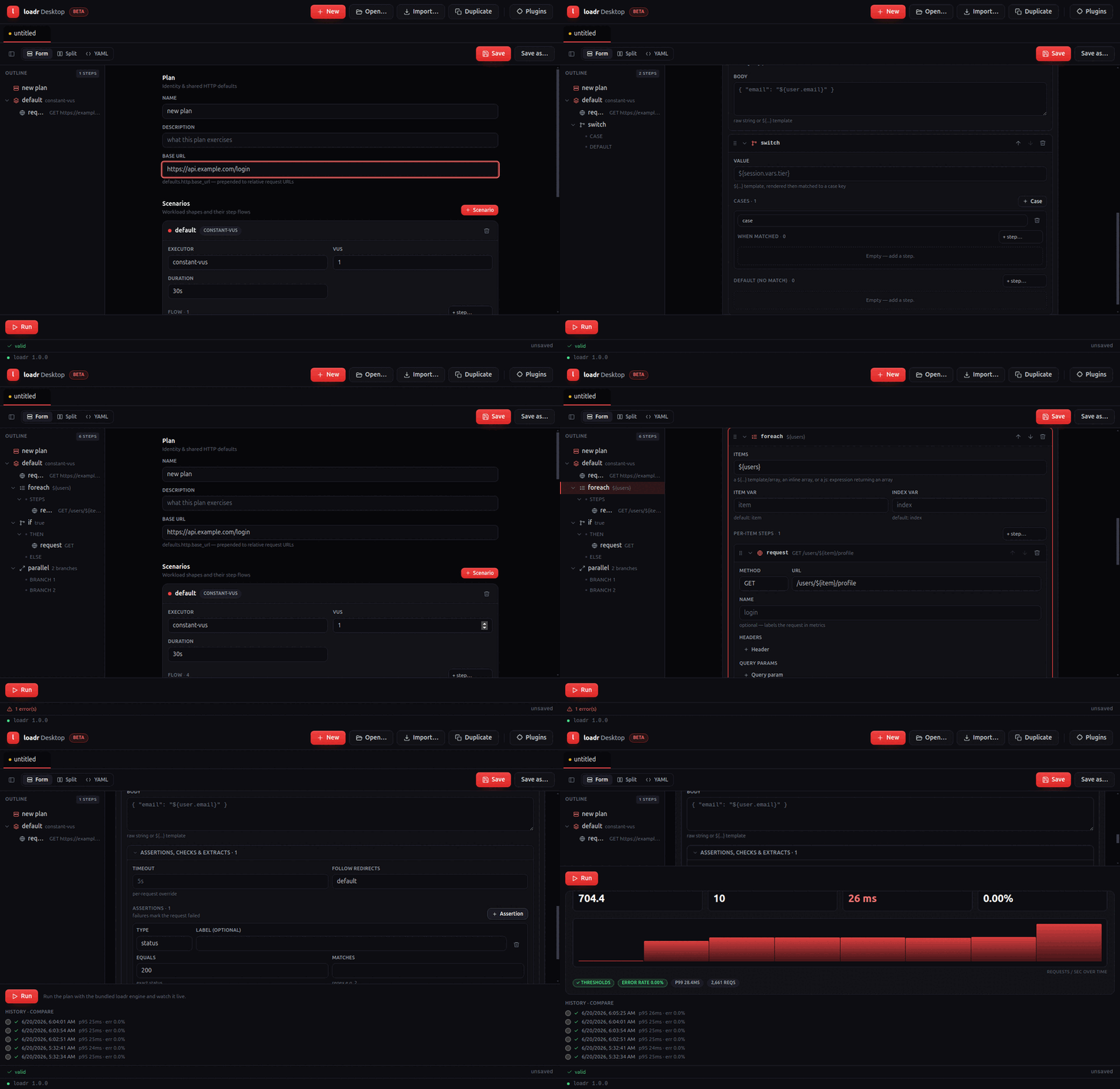
What it does
- Tabbed workspace — one plan per tab, dirty-state markers, New / Open / Import / Duplicate.
- Forms-first composer — a schema-shaped form for the whole plan with a real
editor for every step kind (
request,think_time,js,group,repeat,while,if,foreach,switch,during,retry,parallel,random,rendezvous), including recursive nested-step editors. You never have to drop to YAML to build a plan. - Request assertions, checks & extractors — status/jsonpath/header/duration and the rest of the condition set, plus classic extractors (jsonpath/regex/xpath/css/boundary/header).
- Plan outline — a left-hand tree (Plan → scenarios → flow, recursing through nested steps); click a node to jump to its card.
- Optional YAML view — a
Form / Split / YAMLtoggle backed by Monaco, two-way synced with the forms. Forms-first by default. - Drag-and-drop flow composition, keyboard-accessible (dnd-kit).
- Import JMeter / k6 / HAR via
loadr convert. - Generate with AI — describe a test in plain English ("200 VUs for 2m
against
POST /checkout, assert 200 and p95 < 400ms") or point loadr at a repository (local folder or git URL); it reads the OpenAPI spec / routes and writes a test covering them. Every generated plan is validated againstloadr validate(with one automatic repair pass) before it opens in a tab. Works with your choice of provider — Anthropic (Claude), OpenAI (GPT), Google (Gemini) or xAI (Grok) — using your own API key per provider, stored OS-encrypted; all calls happen in the main process (the renderer stays sandboxed). - Run + live monitoring — a dashboard mirroring the
web UI: live Requests/s, Active VUs, p95 and error tiles, a
streaming throughput chart, threshold pills, a Stop control, plus run
history and run-to-run compare. Every figure comes from the CLI's live
progress stream and
--summary-exporttimeline. Export JUnit writes the run's JUnit report for CI ingestion. - Plugins panel — list / install / remove protocol plugins via
loadr plugin.
How the CLI is bundled
A packaged build is self-contained. At build time
desktop/scripts/stage-loadr.mjs copies the platform-correct loadr binary into
desktop/resources/bin/, and electron-builder ships it via extraResources
(so it lands at <app>/resources/bin/loadr, outside the asar archive and kept
executable). At runtime the app resolves the binary bundled first, then
$LOADR_BIN, then PATH.
Security model
contextIsolationon,nodeIntegrationoff, sandboxed renderer.- The renderer never spawns processes or touches the filesystem; it reaches the main process only through a small, typed, allow-listed preload bridge.
- loadr is spawned with array arguments only — never a shell string — so plan
content can never be interpreted by a shell. Plan content is never
eval'd.
Round-trip guarantee
Opening a .yaml renders the UI; editing it (forms or Monaco) saves YAML that
loadr validate accepts. Property tests prove parse → serialize → parse
preserves the plan over the repo's examples/ corpus, and that a composed plan
covering every step kind validates against the CLI.
Building from source
cd desktop
npm install
npm run dev        # launch (needs a display)
npm test           # unit + round-trip (headless)
npm run package    # stage loadr + electron-builder for this platform
See desktop/README.md
for the full developer guide, CI layout and known environment blockers.
Troubleshooting
The app diagnoses a broken engine on startup and shows a banner explaining the fix, rather than surfacing a raw error on your first run:
- "The bundled loadr engine doesn't match this Mac's processor" — update to the latest loadr Desktop. macOS builds bundle a universal2 loadr engine (both Intel and Apple Silicon slices in one binary), so either download runs natively on either Mac. If you're on an old build, get the latest from loadr.io/download.
- "Couldn't find the loadr engine" — the install is incomplete; reinstall,
or set
LOADR_BINto aloadrbinary. - "…isn't executable (permission denied)" — reinstall, or
chmod +xthe bundled binary.